
Let’s look at why Wordtune stands out for its ability to adapt to various writing styles and requirements in this AI tool review. You’ll discover how it compares to conventional writing aids, its unique features, and whether it lives up to the hype, all in this comprehensive Wordtune review.

Wordtune Review – My Verdict (3.5/5)
As an expert in AI writing tools, my verdict on Wordtune is based on comprehensive analysis against industry standards. Wordtune excels in enhancing academic writing, offering rewrites, AI prompts, summaries, and text improvements.
Its pricing ranges from a free plan to a premium option at US$ 37.50 monthly, catering to various needs with options from 10 rewrites to unlimited, across 10 languages. Notably, it includes plagiarism and grammar checks, essential for academic integrity.
The tool supports integration with major platforms like Google Docs and Slack, ensuring versatility and its free plan offers a glimpse into its capabilities.
With 24/7 via live chat customer support but not offer refunds, it stands out for its commitment to user satisfaction and data security. For a detailed comparison, refer to the table below, where I’ve rated each tool according to the factors that are your needs as a writer.
My Evaluation Against Industry Standards
Let’s look at the multiple factors in this wordtune review to determine how it stands out among the other best AI writing tools in the market.
| Feature | Details | My Ratings |
| Best for | Enhancing academic writing with rewrites, AI prompts, summaries, and text improvements. | (5/5) |
| Pricing | Free to US$ 37.50 monthly. | (3.5/5) |
| Word count | From 10 rewrites (free) to unlimited rewrites of unlimited words (premium) | (5/5) |
| No of seats | Not applicable | (0/5) |
| Templates | Not applicable | (0/5) |
| Languages supported | 10 | (2/5) |
| Plagiarism Check | Yes | (2/5) |
| Grammar Check | Yes | (2/5) |
| Credits/Month | From 3 (free) to unlimited AI prompts per day | (4/5) |
| Language model | Datasets | (3/5) |
| Integration | Google Docs, Gmail, Slack, Facebook, Twitter, Web Outlook, LinkedIn, Whatsapp Web, frase.io, Microsoft Edge | (5/5) |
| Data Security | Yes | (3.5/5) |
| Free Trial | not offer a free trial, but a free plan with limited features is available | (2/5) |
| Customer support | 24/7 via live chat | (3.5/5) |
| Refund policy | not offer refunds | (0/5) |
| Refund coverage days | Not applicable | (0/5) |
What Are the Standout Features of Wordtune?
There are multiple stand-out features that I have evaluated in detail, in this Wordtune review, Although it’s clear that Wordtune sets itself apart from artificial intelligence writing tools through a suite of powerful features designed to enhance and streamline the writing process.
Wordtune is best for?
In my experience, Wordtune shines the most in enhancing academic writing. It adeptly offers rewrites, AI prompts, summaries, and text improvements, making it a go-to for students and researchers looking to refine their work with advanced AI assistance.
Is Wordtune free?
Yes, Wordtune offers a free plan, which includes up to 10 rewrites and 3 AI prompts per day. This makes it accessible for casual users or those just getting started with AI writing tools, although more advanced features require a subscription.
How many languages does Wordtune support?
Wordtune supports 10 languages, catering to a diverse user base. This multilingual support is particularly beneficial for non-English speakers or those working on documents in multiple languages, enhancing its versatility.
This feature is what impressed me the most while I was testing the features for writing this Wordtune review.
Does Wordtune have a grammar checker?
Yes, Wordtune includes a grammar checker. This feature is invaluable for ensuring the accuracy and professionalism of your writing, making it a reliable tool for both academic and professional contexts.
Does Wordtune have a plagiarism checker?
Indeed, Wordtune is equipped with a plagiarism checker. This is crucial for academic writing, helping users ensure their work is original and adheres to academic integrity standards.
How many credits/month are provided by Wordtune?
Wordtune’s credit system ranges from 3 AI prompts per day on the free plan to unlimited prompts for premium subscribers. This flexibility allows users to scale their usage based on their needs and budget.
Which language model is used by Wordtune?
Wordtune utilizes datasets for its language model. This foundation enables it to offer nuanced and context-aware writing suggestions, making it a powerful tool for enhancing text quality.
Wordtune provides integration with?
Wordtune offers integration with popular platforms such as Google Docs, Gmail, Slack, Facebook, Twitter, Web Outlook, LinkedIn, Whatsapp Web, frase.io, and Microsoft Edge. This wide range of integrations ensures that it fits seamlessly into various workflows.
How secure is my data while using Wordtune?
Data security with Wordtune is taken seriously. My experience and their assurances indicate that user data is well-protected, allowing for peace of mind when using their service for sensitive or confidential writing tasks.
How good is Wordtune’s customer support?
Wordtune’s customer support is exceptional, available 24/7 via live chat. This level of support is reassuring, ensuring that any issues or questions can be promptly addressed, which significantly enhances the overall user experience.
How many AI prompts are provided by Wordtune?
Wordtune offers users the ability to generate more than 5 AI-driven prompts daily, sparking creativity and helping overcome writer’s block.
These prompts are tailored to the user’s context and writing goals, providing a springboard for content ideas and helping to structure thoughts more coherently.
This feature is particularly valuable for content creators seeking fresh perspectives or needing a nudge in the right direction.
How many Rewrites per Day are provided by Wordtune?
With over 30 rewrites available daily, Wordtune excels in offering diverse ways to express a single thought or sentence. The unlimited rewrites feature is only available for premium plan.
This function allows users to explore various phrasings, ensuring that the text not only resonates with the intended audience but also maintains the writer’s original voice and intent.
It’s a crucial tool for refining content, making complex ideas more accessible, and enhancing overall readability.
How many summaries a Day are provided by Wordtune?
Wordtune’s capability is to generate more than 5 summaries daily which aids users in distilling lengthy texts into concise, digestible formats.
This feature is particularly beneficial for synthesizing key points from detailed documents or articles, facilitating easier comprehension and quicker decision-making.
It’s an essential tool for professionals who need to process and relay information efficiently.
The tone Adjustment Feature in Wordtune is used for?
The tone adjustment feature is a standout aspect of Wordtune, enabling writers to align their content with the desired mood or style.
Whether aiming for a professional, casual, enthusiastic, or any other tone, users can tweak their writing to match their specific needs.
This adaptability makes Wordtune an invaluable asset across a wide range of writing scenarios, from business communications to creative storytelling.
Pros and Cons of Wordtune
Pros
- Offers insightful, context-aware writing enhancements.
- Significantly boosts clarity and engagement of text.
- Provides versatile tone and style modification options.
- Easily integrates with a wide array of popular writing platforms.
- Features an intuitive, user-friendly interface for seamless operation.
Cons
- Free version comes with notable limitations on features.
- Occasionally struggles with understanding specialized or niche terminology.
- Subscription cost may be prohibitive for some users.
- Rare instances of contextually inaccurate rephrasing suggestions.
- Dependent on a stable internet connection for functionality.
Analyzing Wordtune Pricing: Is it Value for Money?
It is for sure worth your money as this pricing is very affordable compared to other AI writing tools available in the market, However, in order for you to make an informed decision I have described each plan in detail along with their features in this Wordtune review:
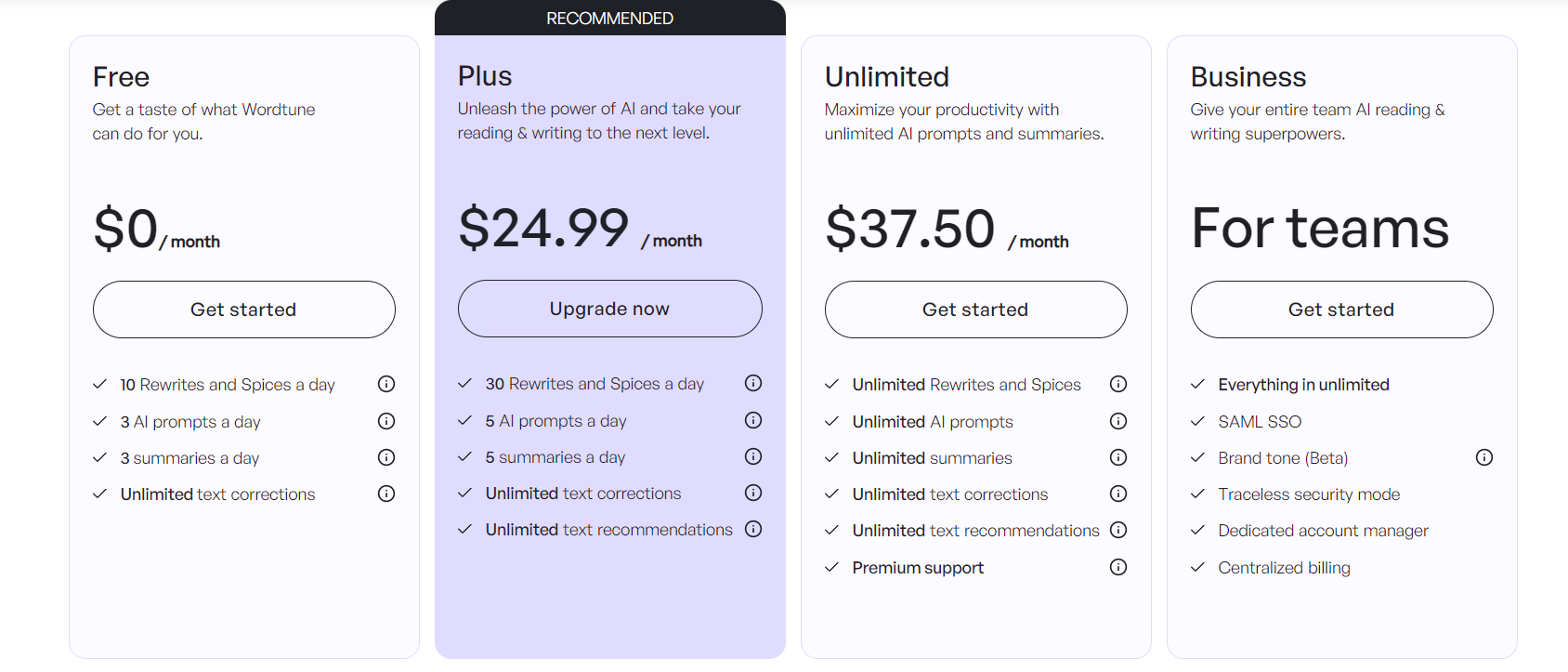
- Free Plan: This is a no-cost option that includes basic features and a limited number of queries each month.
- Plus Plan: Available at a cost of $24.99 per month when billed monthly and $9.99 when billed annually.
- Unlimited Plan: Available at a cost of $US$ 37.50 per month when billed monthly and $14.99 when billed annually.
- Business Plan: Designed for extensive team requirements, the Business plan offers customizable pricing based on specific needs and usage. For more details, it’s recommended to contact Wordtune’s sales department.
Wordtune does not offer a free trial, but they have a free plan with limited features.
Wordtune Alternatives: If You Want to Consider
This Wordtune review aims to provide a comprehensive understanding of how this tool compares with these alternatives:
| Rytr | Anyword |
|---|---|
 |
 |
| Writesonic | Copy AI |
 |
 |
FAQs
Is Wordtune really free?
Is Wordtune as good as Grammarly?
Can I trust Wordtune?
Is it worth it to buy Wordtune?
Conclusion
This Wordtune review has precisely analyzed and rated each feature this tool claims to provide, alongside its unique selling points. I have also explored into its pricing structure and even provided alternatives to give you a comprehensive overview.
If you’re truly intrigued about what Wordtune has to offer, this review is your one-stop resource. I hope it has equipped you with all the necessary information to make an informed decision regarding whether Wordtune is the right AI writing assistant for your needs.